The short answer
- Start with where the customer pays. At one till, at the table, on the road, or at a kiosk. That decides the type of terminal before any brand does.
- Every terminal in Canada must take Interac. Chip and PIN, and Interac Flash for tap. Tap limits go up to $250, set by each card issuer.
- Published prices run from $69 to $999 to buy outright, or about $34 to $35 a month to rent, going by the vendors' own pages on 17 November 2026.
- The terminal is usually locked to one provider. It's loaded with that provider's software and encryption keys. Changing provider often means changing terminal.
- Read the lease, not just the rate. Multiply the monthly fee by the number of months, then compare with the price to buy.
- Offline mode is limited in Canada. Where it exists, it covers credit cards only. Interac doesn't work offline, and Clover devices in Canada take no offline payments at all.
- In a Québec restaurant or bar, the POS software must be certified for Revenu Québec's WEB-SRM. The terminal has to work with it.
Which terminal fits your business
Pick the line that sounds most like your business. Each answer gives the type of terminal that usually fits, why, and what to check first.
Where do most of your customers pay?
You picked: At one counter or till
- The terminal that usually fits
- A countertop terminal, or a compact smart terminal like the Clover Mini
- Why
- It stays put, stays charged, and the customer taps or inserts at the till.
- Check first
- Wired or Wi-Fi connection at the till, and whether you need a receipt printer built in.
You picked: At the table, the curb or on the road
- The terminal that usually fits
- A portable terminal with Wi-Fi and 4G, like the Clover Flex
- Why
- The terminal goes to the customer, so the card never leaves their sight.
- Check first
- Whether cellular data is included or billed monthly, battery life, and tipping on screen.
You picked: A busy counter with items, stock and staff
- The terminal that usually fits
- A POS station with a customer screen, like the Clover Station Duo
- Why
- One device rings up the sale, tracks stock and staff, and shows the customer where to tap and tip.
- Check first
- That your menu or catalogue, taxes and staff roles move over, and who sets it up.
You picked: I already use POS software
- The terminal that usually fits
- A PIN pad that connects to your POS (integrated or semi-integrated)
- Why
- Your POS keeps running the sale; the PIN pad only handles the card, so card data stays out of your POS.
- Check first
- That your POS software supports that exact PIN pad with that exact provider.
You picked: Customers serve themselves
- The terminal that usually fits
- An unattended or self-serve terminal
- Why
- Built for parking, vending, laundromats and kiosks, with no staff at the device.
- Check first
- Weather and tamper resistance, and that it takes Interac Flash.
You picked: Very few sales, or I need a backup
- The terminal that usually fits
- Tap to Pay on your phone
- Why
- No extra hardware: the customer taps their card or phone on yours.
- Check first
- It's tap only, so sales above the customer's tap limit need another way to pay.
You picked: A Québec restaurant or bar
- The terminal that usually fits
- Any of the above, paired with a POS certified for the WEB-SRM
- Why
- Revenu Québec certifies the POS software, not the terminal. The two have to work together.
- Check first
- That the POS is on Revenu Québec's certified list. See the Québec section.
Not sure? Tell us how you sell and we'll suggest a setup.
The seven kinds of payment terminal
Countertop
A wired terminal that stays at the till. Tap, chip and PIN, swipe and keyed entry. Best for one fixed checkout with a stable connection.
Portable (Wi-Fi and 4G)
Carried to the table, the curb, the market stall or the job site. Check whether cellular data is in the price or billed monthly; at least one Canadian vendor charges $9 a month for it.
Smart terminal
A touchscreen terminal that also runs apps: tips, inventory, reports, loyalty. The Clover Flex and Clover Mini are smart terminals.
POS station with a customer screen
A full checkout: your screen faces you, a second screen faces the customer for tap, PIN and tip. The Clover Station Duo is one.
PIN pad for your POS
Your existing POS software runs the sale and the PIN pad handles the card. Common in restaurants and stores that already have POS software they like.
Unattended and self-serve
Weather-resistant terminals for parking, vending, laundromats and kiosks. See unattended payments.
Tap to Pay on a phone
An app turns an iPhone or Android phone into a tap-only terminal. In Canada it takes Interac Flash as well as credit cards. Good for pop-ups, field staff and as a backup.
What every terminal in Canada has to handle
A terminal built for the US market isn't automatically ready for Canada. These are the Canadian must-haves.
| Must-have | What it means at the counter |
|---|---|
| Interac Debit | Interac is its own network. Even on a co-branded card, Interac debit sales must go through Interac. Interac can't place a hold on a card the way credit can. |
| Interac Flash and tap limits | Tap is capped at up to $250, set by each card issuer. Above the limit, or after several taps in a row, the customer inserts the card and enters a PIN. |
| Chip and PIN | Most Canadian sales are tap, or chip and PIN. The terminal asks for the PIN when it's needed. |
| In-person Interac refunds | Interac refunds are done in person, on the same card as the sale. On Clover, the card has to be inserted. |
| French | Québec's Charter of the French language requires receipts in French. Payment screens usually follow the language on the card; your receipts and any custom screens are your job. Clover devices run the payment in English or French. |
| Approved hardware | Ask for the PCI PTS approval number and version. Version 5 approvals end on 30 April 2027; the PCI Security Standards Council recommends version 6 or later for new devices. |
Québec restaurants and bars
If you run a restaurant, bar, take-out counter or caterer in Québec, Revenu Québec's mandatory billing rules apply. You must use a certified sales recording system (SRS) that sends your sales to Revenu Québec's WEB-SRM, and give every customer a bill from that system.
The certified item is the POS software, not the card terminal. Revenu Québec's list had 84 restaurant-sector products on 17 November 2026, including two certified apps for Clover made by other developers, Lightspeed Restaurant (K) and Toast. So the question is: is my POS on the list, and does my terminal work with it?
What a payment terminal costs in Canada
These are the prices vendors publish on their Canadian sites, read on 17 November 2026, before tax. They change, so check the vendor's page before you buy.
| Device | Buy price | Monthly option |
|---|---|---|
| Square Reader (2nd generation) | $69 | None shown |
| Square Stand | $249 | $21 a month over 12 months |
| Square Terminal | $399 | $34 a month over 12 months |
| Square Handheld | $449 | $38 a month over 12 months |
| Square Register | $999 | $84 a month over 12 months |
| Helcim Card Reader | $249 | None |
| Helcim Smart Terminal | $429 | $39 a month for 12 months |
| Moneris Go Terminal and Go Plus | Not shown | $34.95 a month rental |
| Chase Countertop Terminal | By phone | From $33.95 a month rental, plus tax |
| Clover devices | Not published online | Quoted with your setup |
| Stripe readers | In the Stripe Dashboard only | Not shown |
A device price is only part of what you pay. The processing contract, the monthly fees and the term usually cost far more over the life of the terminal. See card processing fees in Canada and what Clover costs in Canada.
Buy, rent or lease
The one calculation that matters: monthly fee × number of months = what you really pay. A $35 monthly fee over four years is $1,680, for a device that sells for a few hundred dollars. Compare the total with the price to buy before you sign.
Buy
You pay once and own the device. Some vendors split the price over 12 months. The catch: if you change provider, a locked terminal may not come with you.
Rent
You pay a monthly fee to your provider and give the device back at the end. Ask what happens if it breaks, and what you're charged if it isn't returned.
Lease
A separate finance contract for a fixed term, sometimes with a leasing company you've never heard of. It can outlive your processing contract and cost several times the device's price.
Fees that come with a terminal
- Monthly rental or lease, per device
- Cellular data plan
- Software or app subscriptions
- PCI compliance fee
- Replacement or swap service
- Shipping
- A charge if you don't return a rented device
- Early termination fee
Each one that applies should be in the summary box at the top of your agreement. See the Code of Conduct section.
"Free terminal" offers
"Free" rarely means free. In the Canadian offers we read on 17 November 2026, "free" meant one of three things:
- A rebate paid later, tied to your sales volume, often after your first 90 days, and only once your application is approved.
- A switch credit that still requires you to buy at least one terminal and process a minimum amount.
- Waived or discounted rental for a limited time, after which the full monthly fee applies.
The processing contract applies either way. A free device on a long contract with a high monthly minimum is not a deal.
Leases, contracts and your right to cancel
Canada's Code of Conduct for the Payment Card Industry, enforced by the Financial Consumer Agency of Canada, has applied since 30 October 2024. Four parts matter for terminals:
- Notice. You must be told about a fee change 30 to 60 days before it takes effect.
- The right to cancel. After a new or higher fee, you can cancel without penalty within 70 days of the date it takes effect. That right extends to related service agreements, which can include a terminal lease arranged through your provider. You still have to return rented equipment.
- No outliving the main contract. Related agreements can't run longer than your processing agreement, and a fixed term can only auto-renew for six months or less.
- The summary box. Your agreement must show whether the terminal is rented, leased or bought, the name of any leasing company, and the early termination fees.
One limit: a lease you signed on your own with an unrelated finance company may not count as a related agreement. Read who the lease is with before you sign it.
Can you bring your own terminal?
Usually not. Each provider certifies specific models and loads them with its own payment software and encryption keys. Stripe, for example, tells merchants to buy readers directly from it so they come loaded with its software and keys.
A terminal you own can only move to a new provider if that provider supports the exact model and can load its own keys. Ask before you switch, not after. And if you're leaving a provider in a hurry, after a hold or an account closure, plan for new hardware.
Offline payments in Canada
When the internet drops, most Canadian setups stop taking cards.
- Clover: Clover devices in Canada can't take payments offline.
- Square: offline payments for up to 24 hours, credit only. Interac doesn't work offline, and you carry the loss if an offline payment is later declined.
- Stripe: Interac isn't supported while offline.
If losing the connection would stop your business, plan a backup: a terminal with 4G as well as Wi-Fi, or a second connection at the till.
Keep your terminal safe
- Keep a list of every terminal, with its serial number and a photo.
- Check it for overlays, loose parts and broken seals, and train staff to spot them. The PCI Data Security Standard expects merchants to inspect their devices regularly.
- Ask for PCI PTS version 6 or later on new devices. Older approvals end on 30 April 2027.
- Ask about point-to-point encryption (P2PE). Card data is encrypted inside the terminal and only decrypted by the provider.
- If a terminal looks or behaves differently, take it out of service and call your provider.
Running terminals across many locations
The more locations you run, the more the terminal turns into an operations problem: different providers, different models, different support numbers, different statements. One provider for every location means one setup, one support line and one statement to read.
Real terminals we set up
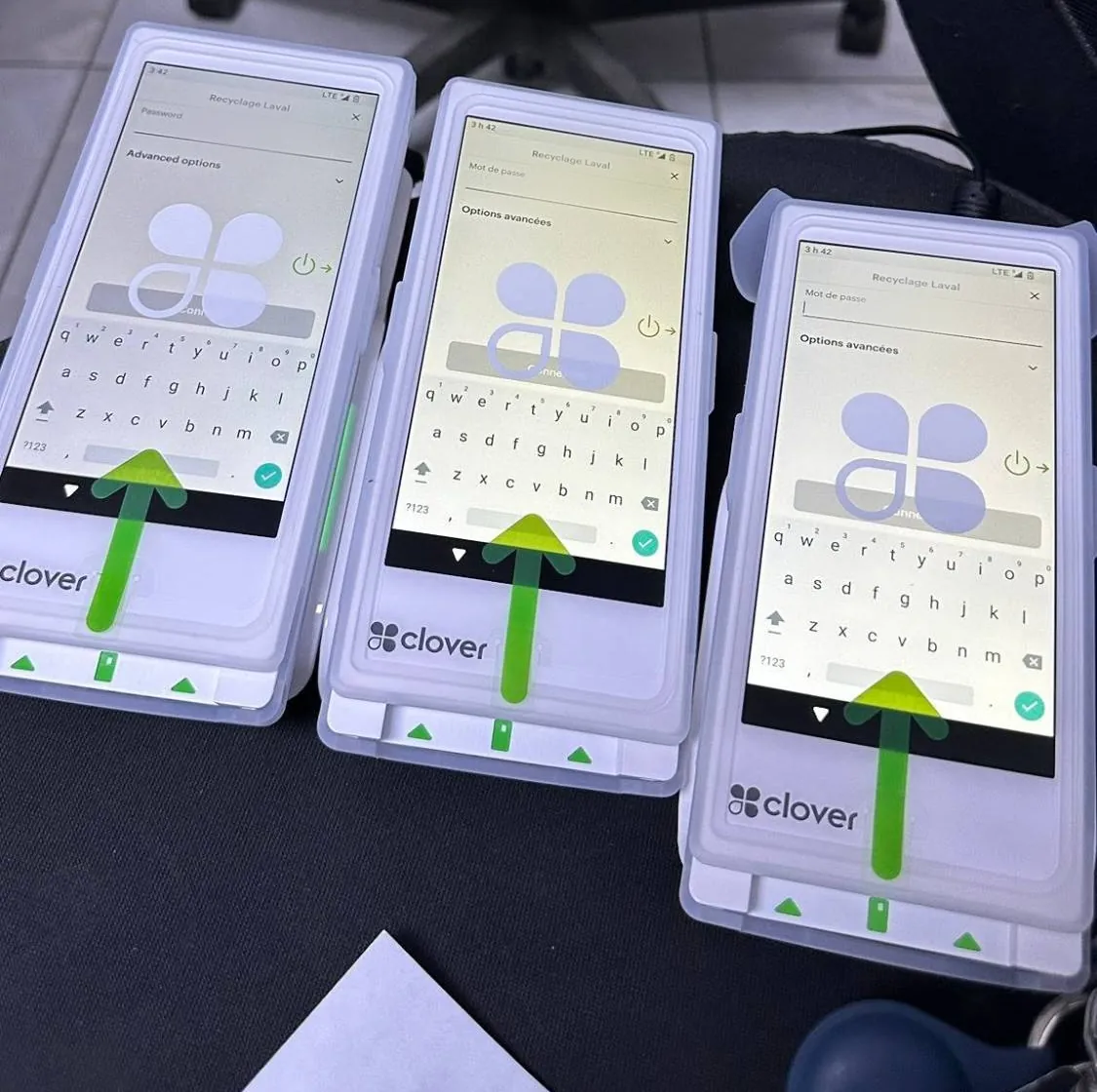
These are terminals we set up for Canadian businesses. Business names on the screens are blurred.
Dental clinic: Clover Mini at the front desk. Bar: two Clover Flex terminals for table and bar service. Café: two Clover Flex terminals at the counter. Auto service shop: Clover Mini at the service counter.
Where CleverPays fits
We help Canadian businesses choose, set up and support payment terminals, including Clover. We start with how you sell, check the contract you have now, and set the terminal up in English or French before it reaches your counter.
- We look at where your customers pay and recommend a type of terminal, not just a brand.
- We read your current agreement for the term, the lease and the exit fees.
- We set the device up for your taxes, tips and staff, and stay your contact after go-live.
Common questions
How much does a payment terminal cost in Canada?
To buy outright, prices published on 17 November 2026 run from $69 for a basic card reader to $999 for a full POS station, before tax. Rentals run about $34 to $35 a month. Leases vary most: multiply the monthly fee by the term to see the full cost.
Can I use any terminal with any processor?
Usually not. Terminals are certified for each provider and loaded with that provider's software and encryption keys. A terminal only moves to a new provider if they support that exact model and can load their keys.
What's the difference between a debit machine and a POS?
A debit machine, or payment terminal, takes the payment. A POS also rings up items, tracks stock and staff, and runs reports. Smart terminals and POS stations do both.
Is Tap to Pay on iPhone available in Canada?
Yes, since May 2024, on an iPhone XS or later. It takes Interac Flash as well as Visa, Mastercard and American Express. It's tap only, so sales above the customer's tap limit need another way to pay.
Does a payment terminal work without internet?
Rarely, in Canada. Where offline mode exists it covers credit cards only, Interac doesn't work offline, and you carry the risk of later declines. Clover devices in Canada take no offline payments.
What's the tap limit in Canada?
Up to $250, set by each card issuer. Above the limit, or after several taps in a row, the customer inserts the card and enters a PIN.
Does my terminal need to be certified in Québec?
The terminal itself isn't what Revenu Québec certifies. Restaurants and bars need a POS certified for the WEB-SRM, and the terminal has to work with that POS.
Can I get out of a terminal lease?
Sometimes. Under the Code of Conduct, after a new or higher fee you can cancel within 70 days without penalty, and that right can extend to a lease arranged through your provider. A lease signed separately with an unrelated finance company may not be covered.
Choosing a terminal?
Sources
- Square Canada: hardware, Square Terminal and Square Reader pages, read 17 November 2026
- Helcim: Smart Terminal and Card Reader pages, read 17 November 2026
- Moneris: Moneris Go and Moneris Go Plus pages, read 17 November 2026
- Chase Canada: Chase Countertop Terminal page, read 17 November 2026
- Clover Developer Docs: Clover devices by country, and Canadian merchants, read 17 November 2026
- Stripe Docs: Terminal in Canada, and placing reader orders, read 17 November 2026
- Apple Newsroom: Tap to Pay on iPhone launches in Canada, 23 May 2024, read 17 November 2026
- Interac: Tap to Pay on iPhone for business, read 17 November 2026
- Interac: higher Interac Debit contactless limits, read 17 November 2026
- Visa Canada: contactless limit increase, 7 April 2020, read 17 November 2026
- Revenu Québec: mandatory billing in the restaurant sector, read 17 November 2026
- Revenu Québec: certified SRSs that work with the WEB-SRM, restaurant sector, read 17 November 2026
- Charter of the French language, CQLR c C-11, read 17 November 2026
- Financial Consumer Agency of Canada: Code of Conduct for the Payment Card Industry in Canada, read 17 November 2026
- PCI Security Standards Council: extension of PTS POI v5 device expiry, 11 September 2025, read 17 November 2026
- RBC and Clover Canada: current terminal promotions, read 17 November 2026